

Key Takeaways
- Lithium-ion batteries work by shuttling ions between two electrodes, not by storing electrical charge like a capacitor.
- Heat is the single biggest enemy of battery longevity - it accelerates chemical degradation inside the cell.
- A charge cycle is one full 0-100% charge equivalent, and most batteries are rated for 300-500 cycles before noticeable capacity loss.
- Keeping a battery between roughly 20% and 80% charge puts less stress on the electrodes over time.
- Modern devices include battery management systems that automatically regulate charging to protect cell health.
Lithium-Ion Battery
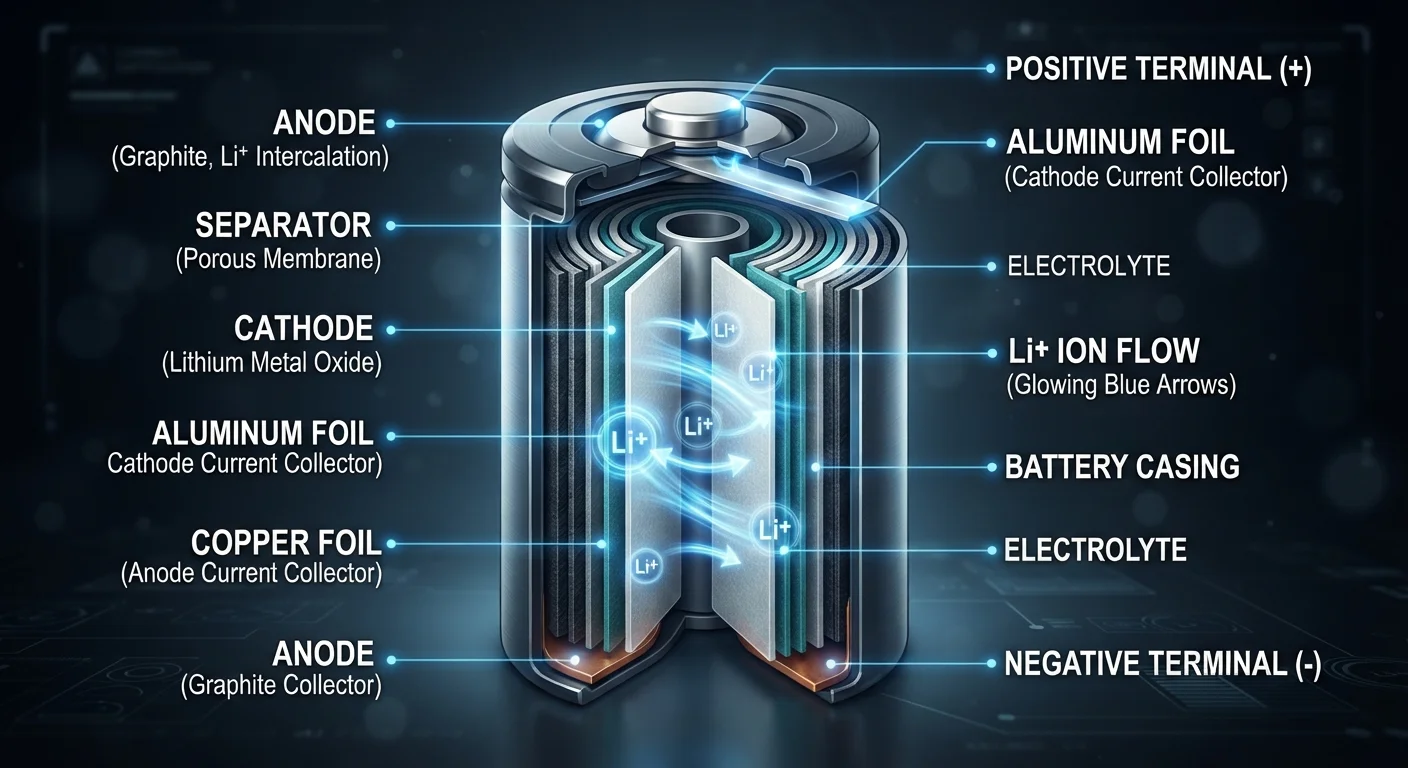
A lithium-ion battery is a rechargeable power source that stores and releases energy by moving lithium ions between two electrodes - an anode and a cathode - through a liquid or gel electrolyte. When you charge a device, ions move to the anode; when you use it, they flow back to the cathode, generating electrical current. This chemistry is lightweight, energy-dense, and capable of hundreds of charge cycles, making it the dominant technology in smartphones, laptops, and tablets.
The electrolyte is typically a lithium salt dissolved in an organic solvent; a thin separator prevents short circuits while allowing ion flow between electrodes.
How a Lithium-Ion Battery Actually Works
Strip away the plastic casing of any modern gadget and you'll find a lithium-ion cell doing something elegantly simple: moving charged atoms back and forth. The battery has three core components - an anode (usually graphite), a cathode (typically a lithium metal oxide compound), and an electrolyte that acts as the highway between them.
When you plug in your phone, an external power source pushes lithium ions from the cathode, through the electrolyte, and into the anode, where they're stored. Electrons travel the opposite way through your charger's circuit - that electron flow is the electrical current doing work. When you unplug and start using your device, the process reverses: ions migrate back to the cathode, releasing electrons that power your screen, processor, and everything else.
The separator - a thin, porous membrane - sits between the anode and cathode. It lets ions pass while preventing the two electrodes from physically touching, which would cause a short circuit. This architecture is why lithium-ion cells are both efficient and, when handled outside their design limits, potentially hazardous.
“The lithium-ion battery has been central to the portable electronics revolution. Understanding the electrochemical principles behind it helps explain both its remarkable versatility and the practical limits users encounter over time.”
— Jeff Dahn, Electrochemistry Professor and lithium-ion battery researcher, Dalhousie University
What a Charge Cycle Really Means
You've probably seen battery specs mention a cycle count, but the term is frequently misunderstood. A single charge cycle doesn't mean one plug-in session - it means the equivalent of one full charge from 0% to 100%. If you charge from 50% to 100% two days in a row, that's one cycle combined.
300-500
Typical full charge cycles before significant capacity loss
Most lithium-ion battery manufacturers rate cells to retain approximately 80% capacity within this cycle range under standard conditions.
~20-80%
Recommended charge range for reduced electrode stress
Battery researchers and device manufacturers frequently cite this range as the sweet spot for minimizing mechanical stress on anode and cathode materials.
10°C rise
Temperature increase that roughly doubles degradation rate
Electrochemical research indicates that for every 10°C increase in operating temperature, chemical reaction rates inside lithium-ion cells approximately double, accelerating capacity fade.
Most consumer lithium-ion batteries are rated to retain around 80% of their original capacity after 300-500 full charge cycles. After that threshold, degradation continues but at a pace that varies based on usage and storage conditions. Knowing this helps frame why a two-year-old phone might feel noticeably less capable at the end of the day - it may have accumulated hundreds of cycles worth of microscopic electrode wear.
For a deeper look at how these patterns relate to real-world habits, see why smartphone batteries degrade over time.
The Biggest Threats to Battery Lifespan
Three factors do the most damage to a lithium-ion battery's long-term health:
- Heat: Elevated temperatures speed up unwanted chemical reactions inside the electrolyte, permanently reducing the battery's capacity to store ions. Leaving a device on a hot car dashboard or running processor-intensive tasks while charging - which generates heat from both ends - are common culprits.
- Extreme state of charge: Batteries under the least mechanical stress when held between roughly 20% and 80%. Sitting at 100% for long periods puts the anode under physical tension; dropping to 0% can cause damaging voltage imbalances in individual cells.
- High charge rates over time: Fast charging is convenient, but it pushes more current through the cell, generating additional heat and stressing electrode materials more than a slower charge would.
Use Your Device's Built-In Battery Settings
Many smartphones and laptops now include battery health or optimized charging options in their settings menus. These features use charging history to slow or pause charging at strategic points, reducing time spent at 100%. Enabling them costs nothing and works automatically in the background.
Modern devices aren't without defenses. A battery management system (BMS) - built into the device - monitors voltage, temperature, and current in real time. It slows charging when the battery gets warm, stops charging at 100%, and can redistribute load across cells in multi-cell packs like laptop batteries.
Understanding these threats directly connects to smarter daily habits. Small charging habits can meaningfully extend how long your devices stay useful.
Putting the Science to Practical Use
You don't need to be an engineer to make decisions that align with how these batteries actually work. A few straightforward principles follow directly from the chemistry:
- Avoid leaving devices in hot cars, direct sunlight, or on surfaces that trap heat during charging.
- If your device offers a setting to limit charging to 80% or schedule charging for off-peak hours, it's worth enabling - this reduces time spent at high state of charge.
- Top-up charging (keeping the battery in the 20-80% range rather than running it to empty before plugging in) is gentler on electrodes than full drain-and-charge cycles.
- Standard charging overnight is generally fine for modern devices with a competent BMS, though avoiding high-heat environments still matters.
Many persistent ideas about batteries - like the need to fully drain before charging - don't hold up to scrutiny. See common battery myths debunked for science-backed answers to the most widespread misconceptions. And if you want a broader framework for device care, keeping your gadgets performing well over time covers charging routines alongside other maintenance habits.